Modjito Try the demo

For Twitch mods and their teams

Moderation, relaxed.

Modjito is the cockpit for your mod team. Chat with AutoMod, mod log, templates, user cards, raids, and snippets, all on one screen. Every action takes one click.

No login needed. The demo runs on a simulated channel. Logging in with Twitch is coming soon.

What Modjito does

More possibilities, all one click away.

Everything you do as a mod on Twitch, and a lot more. No commands to memorize.

Modjito chat

This is where you moderate. What you need sits right at the message or one click away.

  • AutoMod queue with the reason
  • Chat modes and Shield Mode in one click
  • Delete and timeout right at the message
  • Pin for 1 to 30 minutes
  • Commands with suggestions, your own shortcuts
  • New accounts, first messages, and raid leaders flagged
  • Team notes right next to the name
  • Pauses while your mouse is over the chat

Need something else, like channel points or polls? Just show the Twitch chat right next to it.
  • Mod log for your team

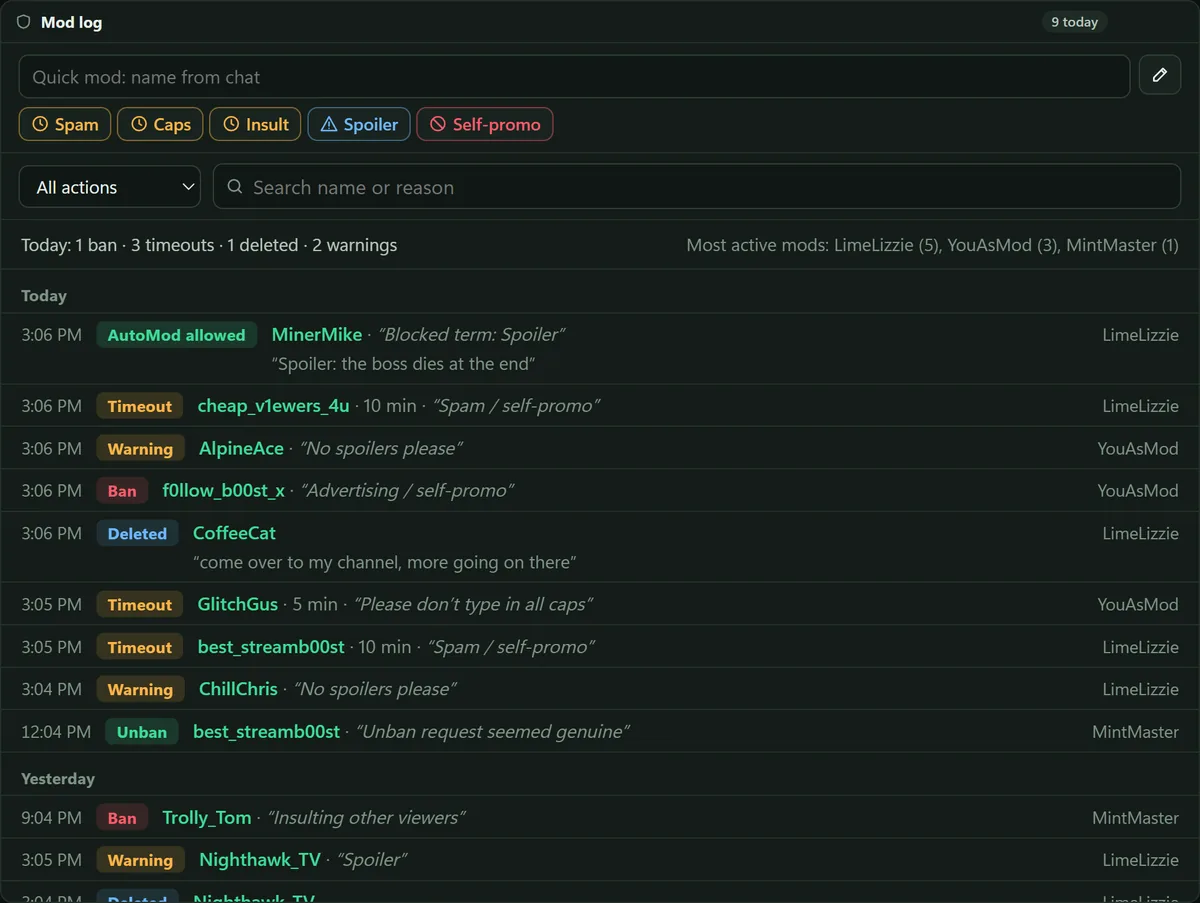
    Every action by every mod, even the ones made directly on Twitch. With filters, search, and daily stats.

  • Timeout with a template

    Create “Spam · Timeout 10 min” once. Then paste the name and click the template. Bans need a second click.

  • User card

    Account age, follow date, messages, and past penalties at a glance, plus your team’s notes.

  • Blocked terms

    Search, block, and unblock terms. Use * as a wildcard, for example “spam*”.

  • Unban requests

    Accept or deny, with a reply if you like. The reason for the ban is one click away.

  • Raids

    Welcome the raid with a shoutout, a message, and a short slow mode, all in one click. Plus your raid targets with live status.

  • Snippets

    Ready-made messages for your team. Copy them, drag them into the chat box, send them right away, or type /discord in the chat.

  • Your own layout

    Move and resize tiles, and everything fits on one screen. Share it with other mods using a code.

Mod log and templates

Timeout with a reason. One click.

Create templates as a team, for example “Spam · Timeout 10 min”. In Quick mod, you just enter the name and click the template. The reason goes to Twitch and shows up in the mod log.

  • Actions by all mods, even the ones made directly on Twitch
  • Filters, search, and daily stats
  • Bans need a second click
Mod log with Quick mod, template buttons, daily stats, and the actions of every mod

AutoMod and Shield Mode

Stay calm when it gets loud.

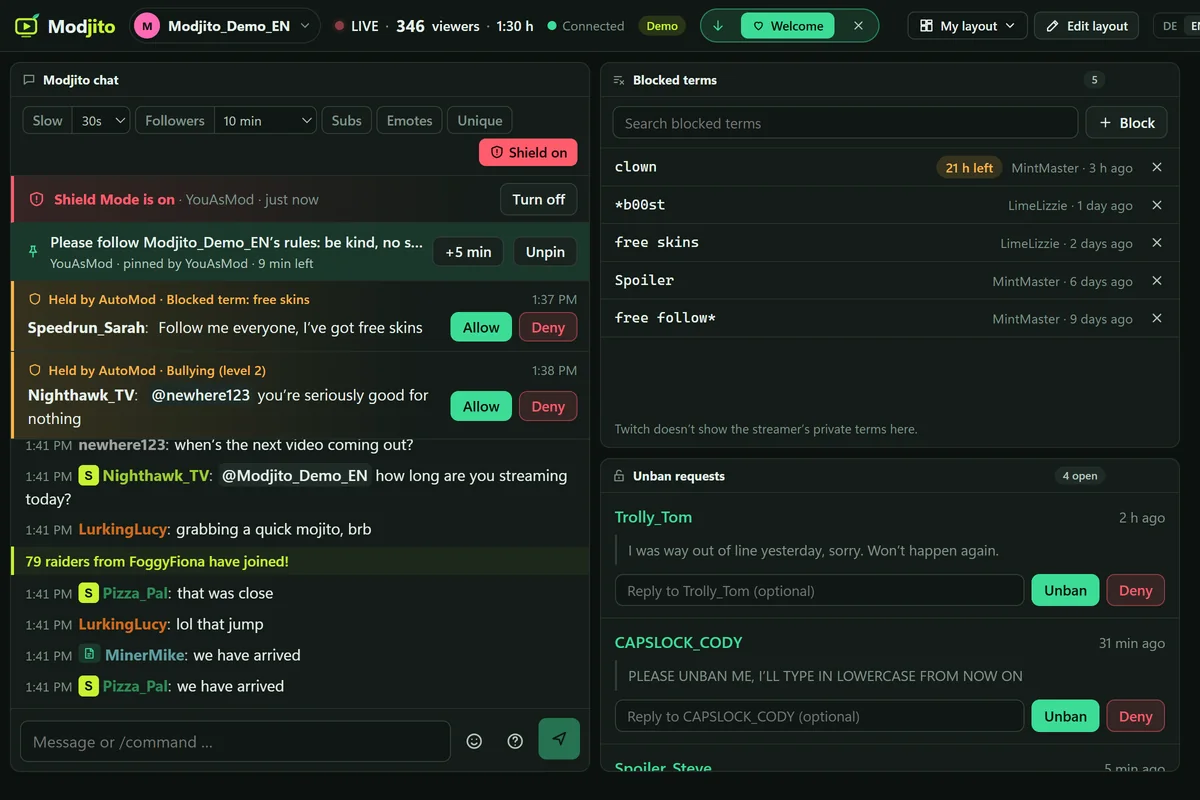
Messages held by AutoMod show up at the top of the Modjito chat, with the reason. Allow or deny them in one click, and every mod sees the decision in the mod log. During a hate raid, one click turns on Shield Mode.

  • Search, add, and remove blocked terms
  • Accept or deny unban requests
  • Shield Mode visible to all mods, also with /shield
Modjito chat with Shield Mode and two held messages, next to blocked terms and unban requests

User card

Every user at a glance.

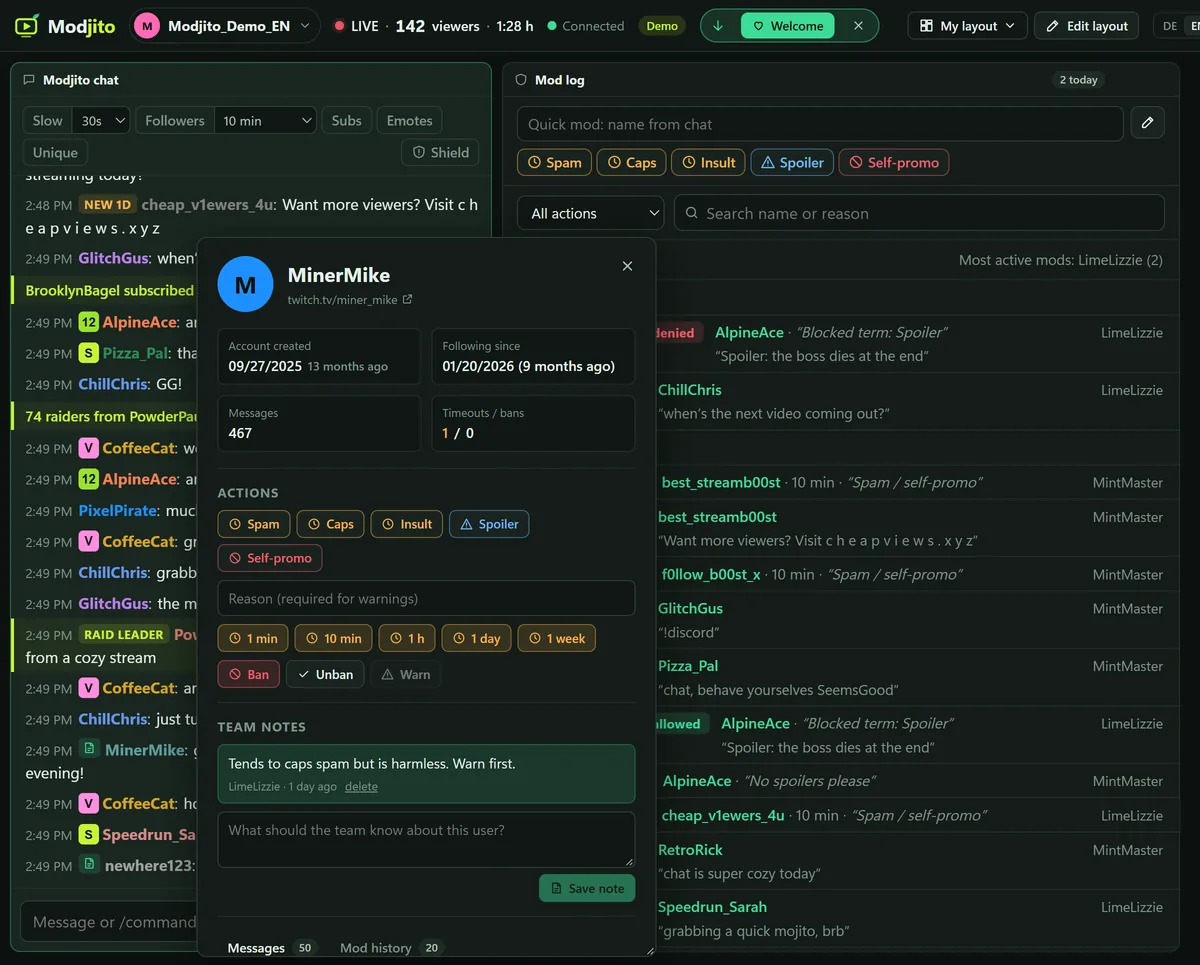
One click on a name, whether it’s in the chat, the mod log, or the raids, and the card opens right next to it. You see account age, follow date, messages, and every mod action, and you can act right away.

  • Templates, timeout, ban, and warn
  • Team notes that every mod can see
  • Move it and resize it like a window
User card right next to the name in the chat, with account age, actions, and a team note

Raids

Welcome the raid. One click.

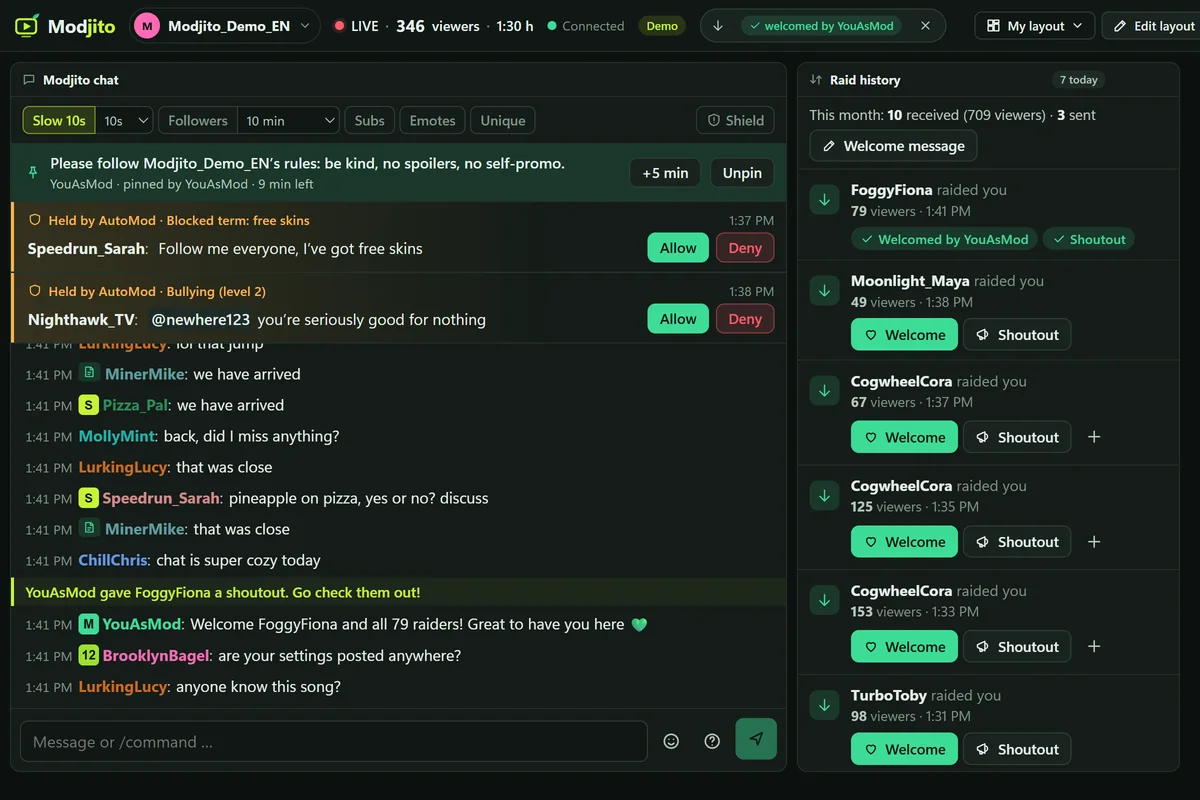
When a raid comes in, it shows up in the bar at the top. “Welcome” gives a shoutout, sends your welcome message, and can briefly turn on slow mode.

  • All mods see who already welcomed the raid
  • Raid history with incoming and outgoing raids
  • Raid targets with live status and notes
Welcomed raid: shoutout and welcome message in the Modjito chat, slow mode on, entry in the raid history

Snippets and pinning

Prepared, not typed.

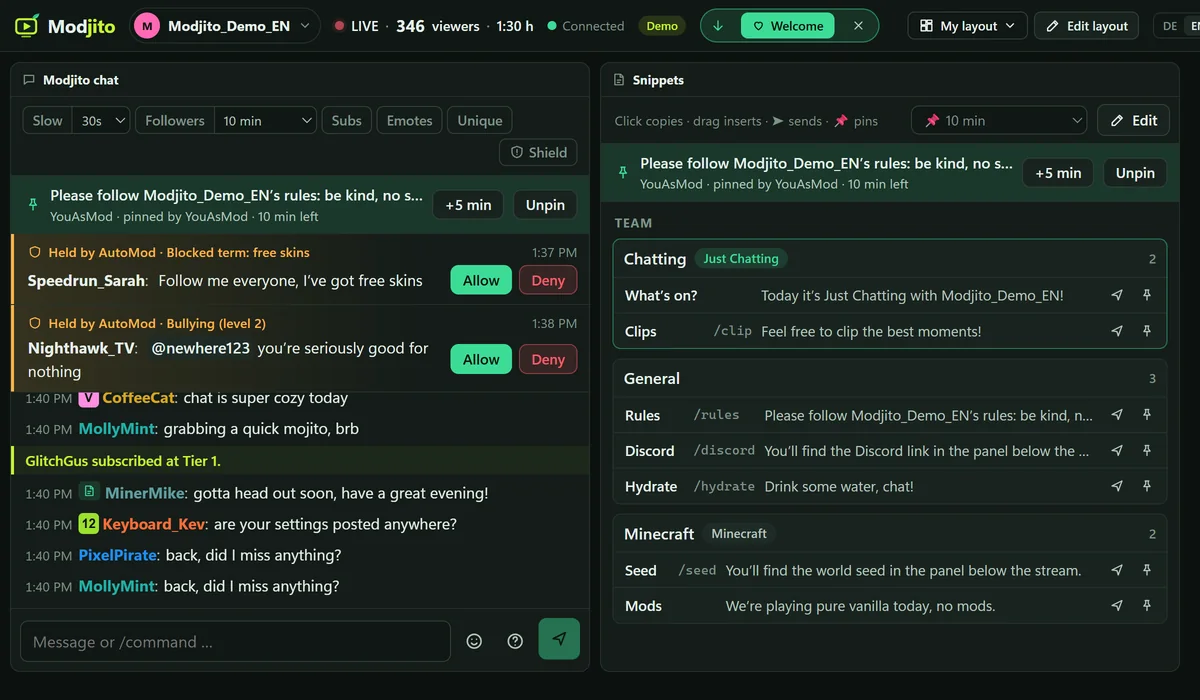
Rules, Discord link, reminders: as snippets for the whole team or just for you. You can link groups to a game, and they stay at the top while that game is on.

  • Copy, drag into the chat box, or send right away
  • Shortcuts like /discord in the Modjito chat
  • Pin with a duration, “+5 min” and “Unpin”
Pinned rules at the top of the Modjito chat, next to the snippets as a table with shortcuts like /discord

Layout

Your cockpit, your layout.

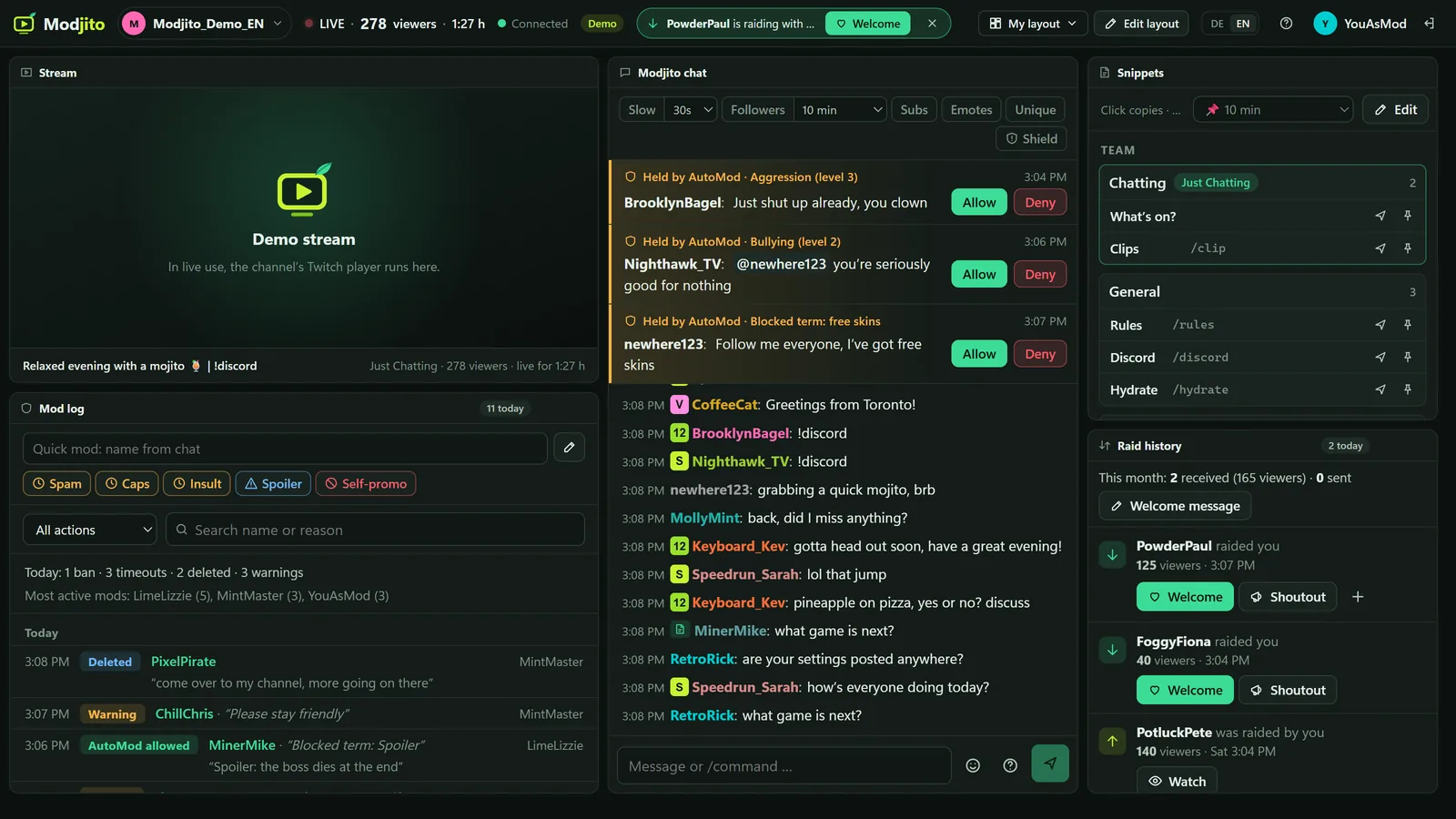
Stream, both chats, mod log, raids, snippets, blocked terms, and more as tiles. Move, resize, add, or remove them, and everything always fits on one screen. Every mod has their own layout, saved to their account.

  • Layout templates like “Chat in focus” or “Raid night”
  • Share code for other mods
  • Font size for each tile
Modjito with the stream, Modjito chat with AutoMod, mod log, snippets, and raid history as tiles

FAQ

Frequently asked questions

Do I need broadcaster permissions?

No. Modjito can do exactly what you can do as a mod on Twitch. You log in with your Twitch account and see your own channel plus every channel where you’re a mod.

What can’t Modjito do?

Start raids, run polls and predictions, change the title or category, and add mods. Through its API, Twitch only allows this with the broadcaster’s own account, so you do it directly on Twitch. There, the broadcaster and their editors start a raid with /raid. Modjito logs every raid automatically, and for your raid targets, one click copies the raid command.

Do I still need the Twitch chat?

You moderate in the Modjito chat. Redeeming channel points, voting in polls, and making predictions only work in the original Twitch chat. That’s why the default layout shows both side by side.

Does anything cover the stream or the Twitch chat?

Not in everyday use: notices and alerts show up in the bar at the top. Only windows like Help or the mod templates sit on top for a moment. While they’re open, Twitch blocks typing in the Twitch chat. Once you close them, Modjito reloads it.

Do I need to install anything?

No. Modjito runs in your browser. Your layouts are saved to your account and work on any computer.

What happens to my data?

Twitch tokens are stored encrypted. Modjito saves chat messages itself, because Twitch doesn’t provide a chat history, and deletes them after 90 days.

Is Modjito made by Twitch?

No. Modjito is an independent tool and isn’t affiliated with Twitch.

Pricing

One subscription per channel.

Pricing is coming soon. Until then, feel free to try the demo.

  • All features
  • For the channel’s whole mod team
  • Runs in your browser, nothing to install
Try the demo
Modjito

Give it a try.

The demo shows a simulated channel with every feature.

Try the demo